> ## Documentation Index
> Fetch the complete documentation index at: https://docs.evidence.studio/llms.txt
> Use this file to discover all available pages before exploring further.
# Text Input
> A text input field that can be used in filters
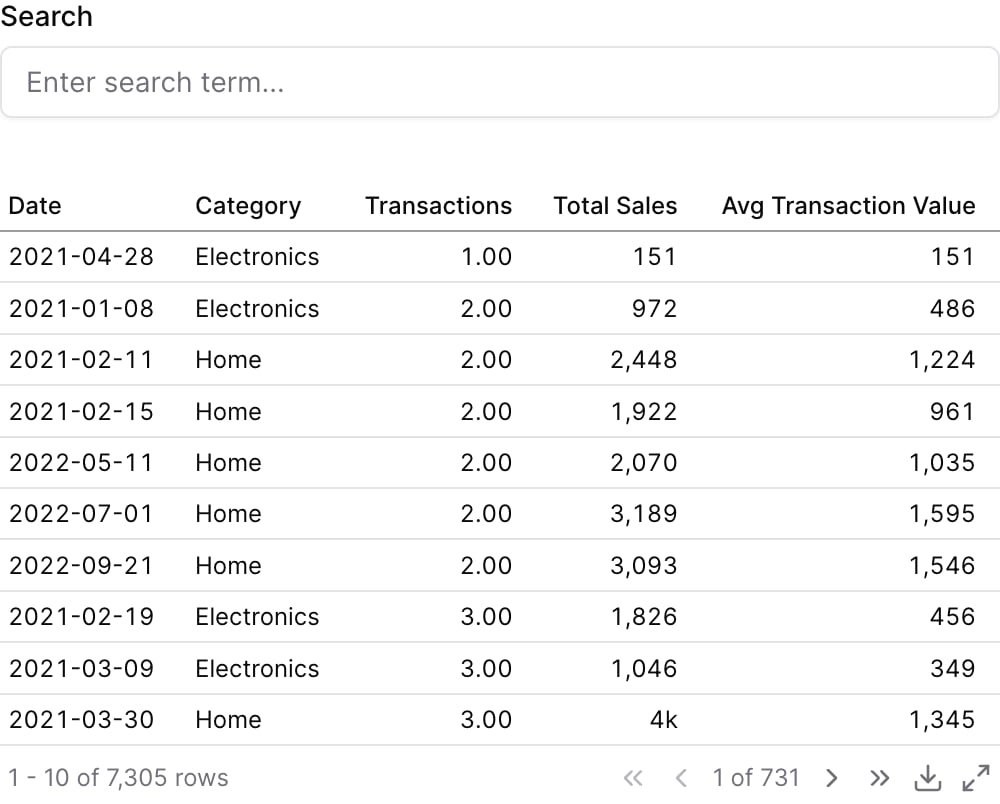 ```liquid theme={null}
{% text_input
id="search"
title="Search"
placeholder="Enter search term..."
/%}
{% table
data="demo.daily_orders"
where="category ilike '%{{search}}%'"
/%}
```
## Examples
### Using `where`
```liquid theme={null}
{% text_input
id="search"
title="Search"
placeholder="Enter search term..."
/%}
{% table
data="demo.daily_orders"
where="category ilike '%{{search}}%'"
/%}
```
### Using Inline SQL
```liquid theme={null}
{% text_input
id="search"
title="Search"
placeholder="Enter search term..."
/%}
{% table
data="demo.daily_orders"
where="category ilike '%{{search}}%'"
/%}
```
## Examples
### Using `where`
```liquid theme={null}
{% text_input
id="search"
title="Search"
placeholder="Enter search term..."
/%}
{% table
data="demo.daily_orders"
where="category ilike '%{{search}}%'"
/%}
```
### Using Inline SQL
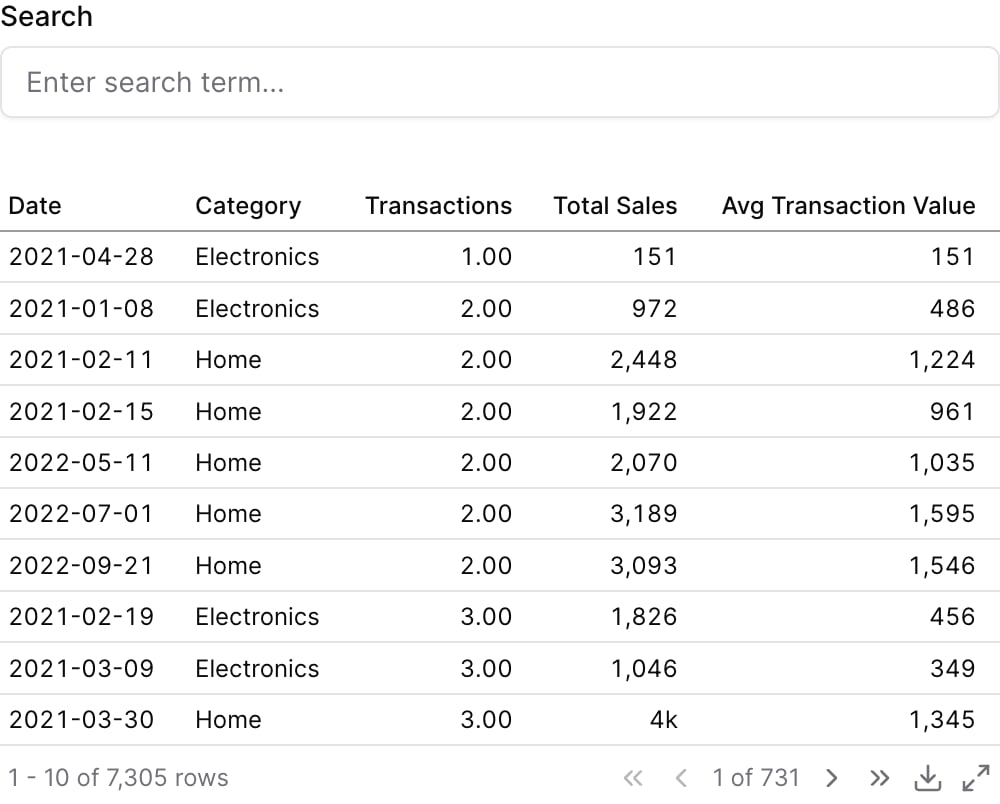 ````liquid theme={null}
{% text_input
id="search"
title="Search"
placeholder="Enter search term..."
/%}
```sql search_results
select * from demo.daily_orders
[[where category ilike '%{{search}}%']]
```
{% table data="search_results" /%}
````
## Attributes
The id of the text input to be used in a `filters` prop
Text displayed above the input
Information tooltip text
URL to link the info text to (can only be used with info)
Create a custom link title for the info link, placed after the info text (can only be used with info\_link)
Icon to display in the input field
**Allowed values:**
* `trending-up`
* `trending-down`
* `clock`
* `calendar`
* `check`
* `x`
* `info`
* `alert-circle`
* `help-circle`
* `eye`
* `eye-off`
* `user`
* `users`
* `settings`
* `cog`
* `plus`
* `minus`
* `up`
* `down`
* `right`
* `left`
* `star`
* `heart`
* `search`
* `file`
* `file-text`
* `home`
* `mail`
* `filter`
* `share`
* `bell`
* `trash`
* `credit-card`
* `globe`
* `key`
* `croissant`
* `map`
* `rotate`
* `rewind`
* `bank`
* `receipt`
* `activity`
* `chart-column`
* `chart-pie`
* `chart-no-axes-combined`
* `goal`
* `rocket`
* `trophy`
* `apple`
* `cookie`
* `donut`
* `beef`
* `cake`
* `soup`
* `utensils`
* `milk`
* `nut`
* `pyramid`
* `triangle`
* `arrow-down`
* `arrow-left`
* `arrow-right`
* `arrow-up`
* `chevron-down`
* `chevron-left`
* `chevron-right`
* `chevron-up`
* `chevrons-down`
* `chevrons-left`
* `chevrons-right`
* `chevrons-up`
* `menu`
* `external-link`
* `check-circle`
* `x-circle`
* `edit`
* `trash-2`
* `copy`
* `save`
* `download`
* `upload`
* `send`
* `refresh`
* `redo`
* `undo`
* `folder`
* `folder-open`
* `image`
* `file-image`
* `user-plus`
* `user-minus`
* `user-check`
* `lock`
* `unlock`
* `log-in`
* `log-out`
* `message-square`
* `message-circle`
* `phone`
* `phone-call`
* `bell-off`
* `video`
* `video-off`
* `play`
* `pause`
* `stop`
* `skip-back`
* `skip-forward`
* `volume`
* `volume-1`
* `volume-2`
* `volume-off`
* `volume-x`
* `bookmark`
* `tag`
* `link`
* `unlink`
* `share-2`
* `alert-triangle`
* `loader`
* `more-vertical`
* `more-horizontal`
* `grid`
* `list`
* `maximize`
* `minimize`
* `zoom-in`
* `zoom-out`
* `thumbs-up`
* `thumbs-down`
* `shopping-cart`
* `dollar-sign`
* `camera`
* `printer`
* `monitor`
* `smartphone`
* `laptop`
* `calculator`
* `cloud-sun-rain`
* `sun-snow`
* `thermometer-sun`
* `thermometer-snowflake`
* `cloudy`
* `cloud-rain-wind`
* `cloud-rain`
* `wind`
* `sun`
* `cloud-snow`
* `thermometer`
* `cloud-drizzle`
* `cloud-sun`
* `cloud`
* `cloud-lightning`
* `snowflake`
* `flame`
* `atom`
* `fuel`
* `magnet`
* `factory`
* `tree-deciduous`
* `waypoints`
* `plug`
* `dam`
* `battery`
Placeholder text displayed when the input is empty
Initial value for the text input
Set the width of this component (in percent) relative to the page width
## Using the Filter Variable
Reference this filter using `{{filter_id}}`. The value returned depends on where you use it.
| Context | Default Property | No Selection | Result |
| ----------------- | ---------------- | ------------ | ------------- |
| Inline SQL query | `.value` | | `search term` |
| `where` attribute | `.value` | | `search term` |
| Text / Markdown | `.value` | | `search term` |
### Available Properties
You can also access specific properties using `{{filter_id.property}}`:
#### .value
Returns the text input value, escaped for safe use in SQL.
````liquid theme={null}
{% text_input id="search_term" /%}
```sql filtered_products
select * from products
where product_name ILIKE '%{{search_term}}%'
```
````
**Example value:** `search term`
````liquid theme={null}
{% text_input
id="search"
title="Search"
placeholder="Enter search term..."
/%}
```sql search_results
select * from demo.daily_orders
[[where category ilike '%{{search}}%']]
```
{% table data="search_results" /%}
````
## Attributes
The id of the text input to be used in a `filters` prop
Text displayed above the input
Information tooltip text
URL to link the info text to (can only be used with info)
Create a custom link title for the info link, placed after the info text (can only be used with info\_link)
Icon to display in the input field
**Allowed values:**
* `trending-up`
* `trending-down`
* `clock`
* `calendar`
* `check`
* `x`
* `info`
* `alert-circle`
* `help-circle`
* `eye`
* `eye-off`
* `user`
* `users`
* `settings`
* `cog`
* `plus`
* `minus`
* `up`
* `down`
* `right`
* `left`
* `star`
* `heart`
* `search`
* `file`
* `file-text`
* `home`
* `mail`
* `filter`
* `share`
* `bell`
* `trash`
* `credit-card`
* `globe`
* `key`
* `croissant`
* `map`
* `rotate`
* `rewind`
* `bank`
* `receipt`
* `activity`
* `chart-column`
* `chart-pie`
* `chart-no-axes-combined`
* `goal`
* `rocket`
* `trophy`
* `apple`
* `cookie`
* `donut`
* `beef`
* `cake`
* `soup`
* `utensils`
* `milk`
* `nut`
* `pyramid`
* `triangle`
* `arrow-down`
* `arrow-left`
* `arrow-right`
* `arrow-up`
* `chevron-down`
* `chevron-left`
* `chevron-right`
* `chevron-up`
* `chevrons-down`
* `chevrons-left`
* `chevrons-right`
* `chevrons-up`
* `menu`
* `external-link`
* `check-circle`
* `x-circle`
* `edit`
* `trash-2`
* `copy`
* `save`
* `download`
* `upload`
* `send`
* `refresh`
* `redo`
* `undo`
* `folder`
* `folder-open`
* `image`
* `file-image`
* `user-plus`
* `user-minus`
* `user-check`
* `lock`
* `unlock`
* `log-in`
* `log-out`
* `message-square`
* `message-circle`
* `phone`
* `phone-call`
* `bell-off`
* `video`
* `video-off`
* `play`
* `pause`
* `stop`
* `skip-back`
* `skip-forward`
* `volume`
* `volume-1`
* `volume-2`
* `volume-off`
* `volume-x`
* `bookmark`
* `tag`
* `link`
* `unlink`
* `share-2`
* `alert-triangle`
* `loader`
* `more-vertical`
* `more-horizontal`
* `grid`
* `list`
* `maximize`
* `minimize`
* `zoom-in`
* `zoom-out`
* `thumbs-up`
* `thumbs-down`
* `shopping-cart`
* `dollar-sign`
* `camera`
* `printer`
* `monitor`
* `smartphone`
* `laptop`
* `calculator`
* `cloud-sun-rain`
* `sun-snow`
* `thermometer-sun`
* `thermometer-snowflake`
* `cloudy`
* `cloud-rain-wind`
* `cloud-rain`
* `wind`
* `sun`
* `cloud-snow`
* `thermometer`
* `cloud-drizzle`
* `cloud-sun`
* `cloud`
* `cloud-lightning`
* `snowflake`
* `flame`
* `atom`
* `fuel`
* `magnet`
* `factory`
* `tree-deciduous`
* `waypoints`
* `plug`
* `dam`
* `battery`
Placeholder text displayed when the input is empty
Initial value for the text input
Set the width of this component (in percent) relative to the page width
## Using the Filter Variable
Reference this filter using `{{filter_id}}`. The value returned depends on where you use it.
| Context | Default Property | No Selection | Result |
| ----------------- | ---------------- | ------------ | ------------- |
| Inline SQL query | `.value` | | `search term` |
| `where` attribute | `.value` | | `search term` |
| Text / Markdown | `.value` | | `search term` |
### Available Properties
You can also access specific properties using `{{filter_id.property}}`:
#### .value
Returns the text input value, escaped for safe use in SQL.
````liquid theme={null}
{% text_input id="search_term" /%}
```sql filtered_products
select * from products
where product_name ILIKE '%{{search_term}}%'
```
````
**Example value:** `search term`