> ## Documentation Index
> Fetch the complete documentation index at: https://docs.evidence.studio/llms.txt
> Use this file to discover all available pages before exploring further.
# Range Calendar
> Display a date range picker for use in SQL query templates
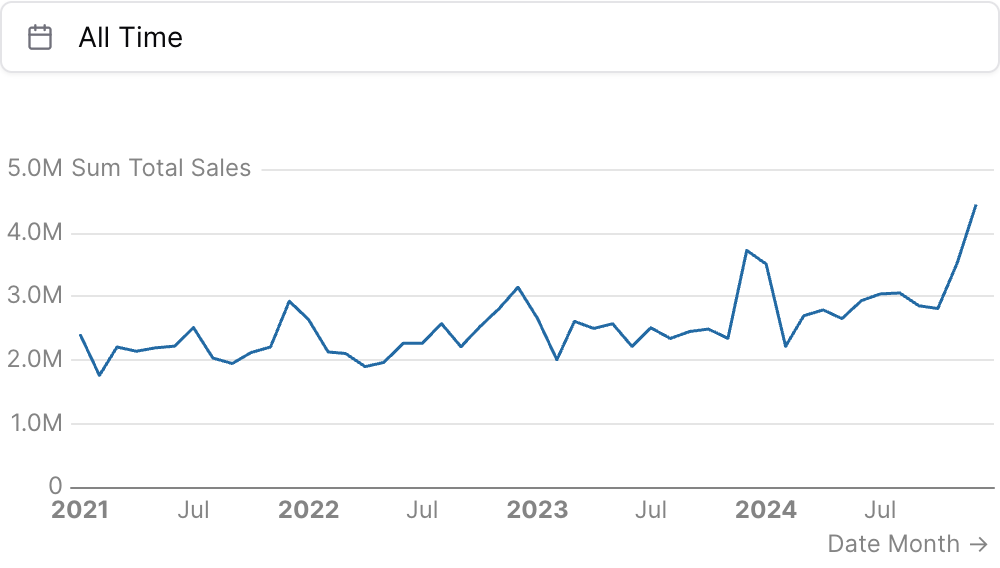 ```liquid theme={null}
{% range_calendar id="date_filter" /%}
{% line_chart
data="demo.daily_orders"
x="date"
y="sum(total_sales)"
date_grain="month"
date_range={
date="date"
range={{date_filter}}
}
/%}
```
## Examples
### Using `date_range`
```liquid theme={null}
{% range_calendar id="date_filter" /%}
{% line_chart
data="demo.daily_orders"
x="date"
y="sum(total_sales)"
date_grain="month"
date_range={
date="date"
range={{date_filter}}
}
/%}
```
### Using `where`
```liquid theme={null}
{% range_calendar id="date_filter" /%}
{% line_chart
data="demo.daily_orders"
x="date"
y="sum(total_sales)"
date_grain="month"
date_range={
date="date"
range={{date_filter}}
}
/%}
```
## Examples
### Using `date_range`
```liquid theme={null}
{% range_calendar id="date_filter" /%}
{% line_chart
data="demo.daily_orders"
x="date"
y="sum(total_sales)"
date_grain="month"
date_range={
date="date"
range={{date_filter}}
}
/%}
```
### Using `where`
 ```liquid theme={null}
{% range_calendar id="date_filter" value_column="date" /%}
{% table
data="demo.daily_orders"
where="{{date_filter.filter}}"
/%}
```
### Using `filters`
```liquid theme={null}
{% range_calendar id="date_filter" value_column="date" /%}
{% table
data="demo.daily_orders"
where="{{date_filter.filter}}"
/%}
```
### Using `filters`
 ```liquid theme={null}
{% range_calendar id="date_filter" value_column="date" /%}
{% big_value
data="demo.daily_orders"
value="sum(total_sales)"
filters=["date_filter"]
/%}
```
### Using Inline SQL
````liquid theme={null}
{% range_calendar id="date_filter" /%}
```sql filtered_orders
select * from demo.daily_orders
where date {{date_filter.between}}
```
{% table data="filtered_orders" /%}
````
### Redefining "all time" with `all_time_range`
```liquid theme={null}
{% range_calendar id="date_filter" value_column="date" all_time_range="from 2022-12-01" /%}
{% big_value
data="demo.daily_orders"
value="sum(total_sales)"
filters=["date_filter"]
/%}
```
### Named presets with `custom_ranges`
```liquid theme={null}
{% range_calendar
id="date_filter"
custom_ranges=[
{ range="last 30 days" },
{ label="FY{start:yyyy}" range="from 2022-02-01" grain="year" },
{ label="Retail {end:yyyy}" range=[
"2024-12-29 to 2025-12-27",
"2025-12-28 to 2026-12-26"
] }
]
/%}
```
## Attributes
The id of the date range picker to be used in SQL query templates (e.g., `{{date_filter.filter}}`)
Text displayed above the date range picker
Default range to select on load: a preset key, or an exact custom\_ranges label. Defaults to "all time".
**Allowed values:**
* `today`
* `yesterday`
* `last 7 days`
* `last 30 days`
* `last 3 months`
* `last 6 months`
* `last 12 months`
* `previous week`
* `previous month`
* `previous quarter`
* `previous year`
* `this week`
* `this month`
* `this quarter`
* `this year`
* `next week`
* `next month`
* `next quarter`
* `next year`
* `week to date`
* `month to date`
* `quarter to date`
* `year to date`
* `all time`
(deprecated) Use default\_range instead. Default range preset to select on load.
**Allowed values:**
* `today`
* `yesterday`
* `last 7 days`
* `last 30 days`
* `last 3 months`
* `last 6 months`
* `last 12 months`
* `previous week`
* `previous month`
* `previous quarter`
* `previous year`
* `this week`
* `this month`
* `this quarter`
* `this year`
* `next week`
* `next month`
* `next quarter`
* `next year`
* `week to date`
* `month to date`
* `quarter to date`
* `year to date`
* `all time`
Array of date range keys to show in the preset list. If not provided, the default preset set is used. Single-day `today`/`yesterday` presets and forward-looking `this ...`/`next ...` presets are not shown by default and must be explicitly included here. When "all time" is excluded and no default is specified, the first preset in this list becomes the default.
Named presets added to the preset list. Each entry is `{ label, range, grain }`: `range` is a window (or list of windows) in normal date-range syntax (e.g. "last 6 months", "from 2022-02-01", "2024-01-01 to today"); the optional `grain` (`day`/`week`/`month`/`quarter`/`year`) slices each window into one preset per period (e.g. a fiscal year per year), anchored to an explicit start date; the optional `label` names each preset with `{start:CODE}` / `{end:CODE}` tokens that format that boundary with any value-formatter date code (`{start:yyyy}` → `2024`, `{start:yy}` → `24`, `{start:mmm}` → `Apr`, `{start:mmmm}` → `April`, `{start:mmm yyyy}` → `Apr 2024`, `{start:d}` → `5`, `{start:qq}` → `Q2`, `{end:yy}` → `24`). Write each entry on its own single line (not expanded across lines), as in the examples below.
The date column to filter. When set, the calendar can be referenced directly with `{{id.filter}}` or listed in a chart's `filters` prop — and returns `true` (a no-op) when no range is selected, so it never breaks the query. Leave it unset to instead reference the column yourself with `{{id.between}}`.
Controls what "all time" resolves to in SQL. `"unbounded"` (default) makes `.between` emit `IS NOT NULL`, so `where="date {{id.between}}"` matches all rows and never breaks. `"none"` keeps the legacy empty string — use it with `[[ ]]` blocks or a `| fallback` when the clause should drop entirely (e.g. to keep NULL-date rows). You can also set a bounded range — a preset key (e.g. `"last 12 months"`), a `custom_ranges` label, or a range expression (e.g. `"from 2022-12-01"`) — so "all time" resolves to that range everywhere (`.between`, `.start`, `.end`, and the `date_range` value).
**Allowed values:**
* `today`
* `yesterday`
* `last 7 days`
* `last 30 days`
* `last 3 months`
* `last 6 months`
* `last 12 months`
* `previous week`
* `previous month`
* `previous quarter`
* `previous year`
* `this week`
* `this month`
* `this quarter`
* `this year`
* `next week`
* `next month`
* `next quarter`
* `next year`
* `week to date`
* `month to date`
* `quarter to date`
* `year to date`
* `all time`
Set the width of this component (in percent) relative to the page width
## Using the Filter Variable
Reference this filter using `{{filter_id}}`. The value returned depends on where you use it.
| Context | Default Property | No Selection | Result |
| ----------------- | ---------------- | ------------- | ------------------------------------------------------- |
| Inline SQL query | `.between` | `IS NOT NULL` | `BETWEEN toDate('2024-01-01') AND toDate('2024-12-31')` |
| `where` attribute | `.between` | `IS NOT NULL` | `BETWEEN toDate('2024-01-01') AND toDate('2024-12-31')` |
| Text / Markdown | `.range` | | `Last 6 Months` |
### Available Properties
You can also access specific properties using `{{filter_id.property}}`:
#### .start
Returns the start date as a date expression. Empty when "all time" is selected — reference it only where an empty value should fail loudly (e.g. `where date >= {{date_filter.start}}`), not in a date spine or axis bound.
````liquid theme={null}
{% range_calendar id="date_filter" /%}
```sql filtered_data
select * from events
where event_date >= {{date_filter.start}}
```
````
**Example value:** `toDate('2024-01-01')`
#### .end
Returns the end date as a date expression. Empty when "all time" is selected (see `.start`).
````liquid theme={null}
{% range_calendar id="date_filter" /%}
```sql filtered_data
select * from events
where event_date <= {{date_filter.end}}
```
````
**Example value:** `toDate('2024-12-31')`
#### .filter
Returns a complete SQL filter expression for the date range — `value_column >= start AND value_column <= end`. Requires `value_column`: without it (or when no range is selected) it resolves to `true`, i.e. no filtering, so `where="{{id.filter}}"` silently returns everything unless `value_column` is set.
````liquid theme={null}
{% range_calendar id="date_filter" value_column="event_date" /%}
```sql filtered_data
select * from events
where {{date_filter.filter}}
```
````
**Example value:** `event_date >= toDate('2024-01-01') AND event_date <= toDate('2024-12-31')`
#### .between
Returns a WHERE-clause fragment for the date range: `BETWEEN AND ` when a range is selected, and `IS NOT NULL` when "all time" is selected — so `where="date {{date_filter.between}}"` matches all rows and never breaks. Because "all time" emits `IS NOT NULL`, it excludes rows whose date is NULL; set `all_time_range="none"` to restore the legacy empty string (for use with `[[ ]]` blocks or `| fallback`).
````liquid theme={null}
{% range_calendar id="date_filter" /%}
```sql filtered_data
select * from events
where date {{date_filter.between}}
```
````
**Example value:** `BETWEEN toDate('2024-01-01') AND toDate('2024-12-31')`
#### .range
Returns a human-readable description of the selected range. This is the value to use with `date_range` attribute.
```liquid theme={null}
{% range_calendar id="date_filter" /%}
{% line_chart
data="demo.daily_orders"
x="date"
y="sum(total_sales)"
date_range={
date="date"
range={{date_filter}}
}
/%}
```
**Example value:** `Last 6 Months`
```liquid theme={null}
{% range_calendar id="date_filter" value_column="date" /%}
{% big_value
data="demo.daily_orders"
value="sum(total_sales)"
filters=["date_filter"]
/%}
```
### Using Inline SQL
````liquid theme={null}
{% range_calendar id="date_filter" /%}
```sql filtered_orders
select * from demo.daily_orders
where date {{date_filter.between}}
```
{% table data="filtered_orders" /%}
````
### Redefining "all time" with `all_time_range`
```liquid theme={null}
{% range_calendar id="date_filter" value_column="date" all_time_range="from 2022-12-01" /%}
{% big_value
data="demo.daily_orders"
value="sum(total_sales)"
filters=["date_filter"]
/%}
```
### Named presets with `custom_ranges`
```liquid theme={null}
{% range_calendar
id="date_filter"
custom_ranges=[
{ range="last 30 days" },
{ label="FY{start:yyyy}" range="from 2022-02-01" grain="year" },
{ label="Retail {end:yyyy}" range=[
"2024-12-29 to 2025-12-27",
"2025-12-28 to 2026-12-26"
] }
]
/%}
```
## Attributes
The id of the date range picker to be used in SQL query templates (e.g., `{{date_filter.filter}}`)
Text displayed above the date range picker
Default range to select on load: a preset key, or an exact custom\_ranges label. Defaults to "all time".
**Allowed values:**
* `today`
* `yesterday`
* `last 7 days`
* `last 30 days`
* `last 3 months`
* `last 6 months`
* `last 12 months`
* `previous week`
* `previous month`
* `previous quarter`
* `previous year`
* `this week`
* `this month`
* `this quarter`
* `this year`
* `next week`
* `next month`
* `next quarter`
* `next year`
* `week to date`
* `month to date`
* `quarter to date`
* `year to date`
* `all time`
(deprecated) Use default\_range instead. Default range preset to select on load.
**Allowed values:**
* `today`
* `yesterday`
* `last 7 days`
* `last 30 days`
* `last 3 months`
* `last 6 months`
* `last 12 months`
* `previous week`
* `previous month`
* `previous quarter`
* `previous year`
* `this week`
* `this month`
* `this quarter`
* `this year`
* `next week`
* `next month`
* `next quarter`
* `next year`
* `week to date`
* `month to date`
* `quarter to date`
* `year to date`
* `all time`
Array of date range keys to show in the preset list. If not provided, the default preset set is used. Single-day `today`/`yesterday` presets and forward-looking `this ...`/`next ...` presets are not shown by default and must be explicitly included here. When "all time" is excluded and no default is specified, the first preset in this list becomes the default.
Named presets added to the preset list. Each entry is `{ label, range, grain }`: `range` is a window (or list of windows) in normal date-range syntax (e.g. "last 6 months", "from 2022-02-01", "2024-01-01 to today"); the optional `grain` (`day`/`week`/`month`/`quarter`/`year`) slices each window into one preset per period (e.g. a fiscal year per year), anchored to an explicit start date; the optional `label` names each preset with `{start:CODE}` / `{end:CODE}` tokens that format that boundary with any value-formatter date code (`{start:yyyy}` → `2024`, `{start:yy}` → `24`, `{start:mmm}` → `Apr`, `{start:mmmm}` → `April`, `{start:mmm yyyy}` → `Apr 2024`, `{start:d}` → `5`, `{start:qq}` → `Q2`, `{end:yy}` → `24`). Write each entry on its own single line (not expanded across lines), as in the examples below.
The date column to filter. When set, the calendar can be referenced directly with `{{id.filter}}` or listed in a chart's `filters` prop — and returns `true` (a no-op) when no range is selected, so it never breaks the query. Leave it unset to instead reference the column yourself with `{{id.between}}`.
Controls what "all time" resolves to in SQL. `"unbounded"` (default) makes `.between` emit `IS NOT NULL`, so `where="date {{id.between}}"` matches all rows and never breaks. `"none"` keeps the legacy empty string — use it with `[[ ]]` blocks or a `| fallback` when the clause should drop entirely (e.g. to keep NULL-date rows). You can also set a bounded range — a preset key (e.g. `"last 12 months"`), a `custom_ranges` label, or a range expression (e.g. `"from 2022-12-01"`) — so "all time" resolves to that range everywhere (`.between`, `.start`, `.end`, and the `date_range` value).
**Allowed values:**
* `today`
* `yesterday`
* `last 7 days`
* `last 30 days`
* `last 3 months`
* `last 6 months`
* `last 12 months`
* `previous week`
* `previous month`
* `previous quarter`
* `previous year`
* `this week`
* `this month`
* `this quarter`
* `this year`
* `next week`
* `next month`
* `next quarter`
* `next year`
* `week to date`
* `month to date`
* `quarter to date`
* `year to date`
* `all time`
Set the width of this component (in percent) relative to the page width
## Using the Filter Variable
Reference this filter using `{{filter_id}}`. The value returned depends on where you use it.
| Context | Default Property | No Selection | Result |
| ----------------- | ---------------- | ------------- | ------------------------------------------------------- |
| Inline SQL query | `.between` | `IS NOT NULL` | `BETWEEN toDate('2024-01-01') AND toDate('2024-12-31')` |
| `where` attribute | `.between` | `IS NOT NULL` | `BETWEEN toDate('2024-01-01') AND toDate('2024-12-31')` |
| Text / Markdown | `.range` | | `Last 6 Months` |
### Available Properties
You can also access specific properties using `{{filter_id.property}}`:
#### .start
Returns the start date as a date expression. Empty when "all time" is selected — reference it only where an empty value should fail loudly (e.g. `where date >= {{date_filter.start}}`), not in a date spine or axis bound.
````liquid theme={null}
{% range_calendar id="date_filter" /%}
```sql filtered_data
select * from events
where event_date >= {{date_filter.start}}
```
````
**Example value:** `toDate('2024-01-01')`
#### .end
Returns the end date as a date expression. Empty when "all time" is selected (see `.start`).
````liquid theme={null}
{% range_calendar id="date_filter" /%}
```sql filtered_data
select * from events
where event_date <= {{date_filter.end}}
```
````
**Example value:** `toDate('2024-12-31')`
#### .filter
Returns a complete SQL filter expression for the date range — `value_column >= start AND value_column <= end`. Requires `value_column`: without it (or when no range is selected) it resolves to `true`, i.e. no filtering, so `where="{{id.filter}}"` silently returns everything unless `value_column` is set.
````liquid theme={null}
{% range_calendar id="date_filter" value_column="event_date" /%}
```sql filtered_data
select * from events
where {{date_filter.filter}}
```
````
**Example value:** `event_date >= toDate('2024-01-01') AND event_date <= toDate('2024-12-31')`
#### .between
Returns a WHERE-clause fragment for the date range: `BETWEEN AND ` when a range is selected, and `IS NOT NULL` when "all time" is selected — so `where="date {{date_filter.between}}"` matches all rows and never breaks. Because "all time" emits `IS NOT NULL`, it excludes rows whose date is NULL; set `all_time_range="none"` to restore the legacy empty string (for use with `[[ ]]` blocks or `| fallback`).
````liquid theme={null}
{% range_calendar id="date_filter" /%}
```sql filtered_data
select * from events
where date {{date_filter.between}}
```
````
**Example value:** `BETWEEN toDate('2024-01-01') AND toDate('2024-12-31')`
#### .range
Returns a human-readable description of the selected range. This is the value to use with `date_range` attribute.
```liquid theme={null}
{% range_calendar id="date_filter" /%}
{% line_chart
data="demo.daily_orders"
x="date"
y="sum(total_sales)"
date_range={
date="date"
range={{date_filter}}
}
/%}
```
**Example value:** `Last 6 Months`