> ## Documentation Index
> Fetch the complete documentation index at: https://docs.evidence.studio/llms.txt
> Use this file to discover all available pages before exploring further.
# Button Group
> Display a segmented button group with distinct values from a database column to use in filters
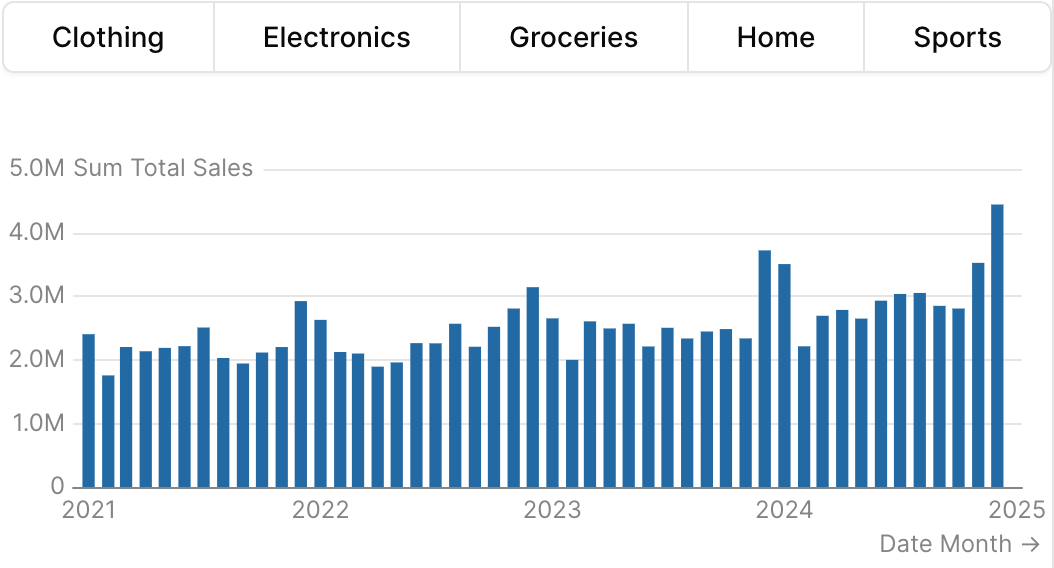 ```liquid theme={null}
{% button_group
id="category_filter"
data="demo.daily_orders"
value_column="category"
/%}
{% bar_chart
data="demo.daily_orders"
x="date"
y="sum(total_sales)"
filters=["category_filter"]
date_grain="month"
/%}
```
## Examples
### Using `filters`
```liquid theme={null}
{% button_group
id="category_filter"
data="demo.daily_orders"
value_column="category"
/%}
{% bar_chart
data="demo.daily_orders"
x="date"
y="sum(total_sales)"
filters=["category_filter"]
date_grain="month"
/%}
```
### Using `where`
```liquid theme={null}
{% button_group
id="category_filter"
data="demo.daily_orders"
value_column="category"
/%}
{% bar_chart
data="demo.daily_orders"
x="date"
y="sum(total_sales)"
filters=["category_filter"]
date_grain="month"
/%}
```
## Examples
### Using `filters`
```liquid theme={null}
{% button_group
id="category_filter"
data="demo.daily_orders"
value_column="category"
/%}
{% bar_chart
data="demo.daily_orders"
x="date"
y="sum(total_sales)"
filters=["category_filter"]
date_grain="month"
/%}
```
### Using `where`
 ```liquid theme={null}
{% button_group
id="category_filter"
data="demo.daily_orders"
value_column="category"
/%}
{% bar_chart
data="demo.daily_orders"
x="date"
y="sum(total_sales)"
where="category = {{category_filter}}"
date_grain="month"
/%}
```
### Using Inline SQL
````liquid theme={null}
{% button_group
id="category_filter"
data="demo.daily_orders"
value_column="category"
/%}
```sql filtered_orders
select * from demo.daily_orders
where category = {{category_filter}}
```
{% table data="filtered_orders" /%}
````
### Vertical orientation inside a row
```liquid theme={null}
{% button_group
id="category_filter"
data="demo.daily_orders"
value_column="category"
/%}
{% bar_chart
data="demo.daily_orders"
x="date"
y="sum(total_sales)"
where="category = {{category_filter}}"
date_grain="month"
/%}
```
### Using Inline SQL
````liquid theme={null}
{% button_group
id="category_filter"
data="demo.daily_orders"
value_column="category"
/%}
```sql filtered_orders
select * from demo.daily_orders
where category = {{category_filter}}
```
{% table data="filtered_orders" /%}
````
### Vertical orientation inside a row
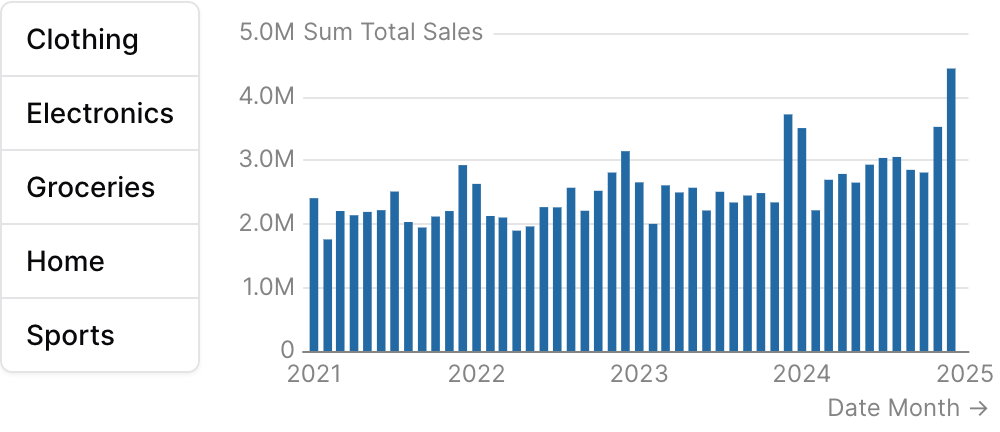 ```liquid theme={null}
{% row %}
{% button_group
id="category_filter"
data="demo.daily_orders"
value_column="category"
orientation="vertical"
/%}
{% bar_chart
data="demo.daily_orders"
x="date"
y="sum(total_sales)"
filters=["category_filter"]
date_grain="month"
/%}
{% /row %}
```
## Attributes
The id of the button group to be used in a `filters` prop
Name of the table to query
Array of filter IDs to apply when querying for options
Column name to use as the value for each option, and the column to filter by when this button group's `id` is used in the `filters` prop of a chart
Column name to use as the label for each option
Text displayed above the button group
Information tooltip text
Initial selected value(s)
Allows multiple selections
Automatically select the first option when the component loads
Layout direction of the button group. Use "vertical" to stack buttons in a column. Best paired with a sibling element inside a `row` so the stack sits alongside its target content.
**Allowed values:**
* `horizontal`
* `vertical`
Maximum height in pixels for the button stack when `orientation="vertical"`. Buttons scroll if the list overflows. Ignored when horizontal.
Column name(s) with optional direction (e.g. "column\_name", "column\_name desc")
Custom SQL WHERE condition to apply to the query. For date filters, use date\_range instead.
Use date\_range to filter data for specific time periods. Accepts predefined ranges (e.g., "last 12 months"), dynamic ranges (e.g., "Last 90 days"), custom date ranges (e.g., "2020-01-01 to 2023-03-01"), or partial ranges (e.g., "from 2020-01-01", "until 2023-03-01")
**Example:**
```
date_range={
range = "today"
date = "string"
}
```
**Attributes:**
* range: `string` - Time period to filter. Use presets like 'last 7 days', dynamic patterns like 'Last 90 days', custom ranges like '2020-01-01 to 2023-03-01', or partial ranges like 'from 2020-01-01'.
* **Allowed values:**
* `today`
* `yesterday`
* `last 7 days`
* `last 30 days`
* `last 3 months`
* `last 6 months`
* `last 12 months`
* `previous week`
* `previous month`
* `previous quarter`
* `previous year`
* `this week`
* `this month`
* `this quarter`
* `this year`
* `next week`
* `next month`
* `next quarter`
* `next year`
* `week to date`
* `month to date`
* `quarter to date`
* `year to date`
* `all time`
* date: `string` - Date column to filter on. Required when the data has multiple date columns.
## Using the Filter Variable
Reference this filter using `{{filter_id}}`. The value returned depends on where you use it.
The examples below show values for three scenarios:
* **No selection**
* **Single select:** "Electronics" selected
* **Multi select:** "Sports" and "Home" selected (when `multiple=true`)
| Context | Default Property | No Selection | Single Select | Multi Select |
| ----------------- | ---------------- | ------------ | --------------- | -------------------- |
| Inline SQL query | `.selected` | `''` | `'Electronics'` | `('Sports', 'Home')` |
| `where` attribute | `.selected` | `''` | `'Electronics'` | `('Sports', 'Home')` |
| Text / Markdown | `.literal` | | `Electronics` | `Sports, Home` |
### Available Properties
You can also access specific properties using `{{filter_id.property}}`:
#### .filter
Returns a complete SQL filter expression ready to use in WHERE clauses. Returns `true` when no value is selected.
````liquid theme={null}
{% button_group id="category_filter" data="products" value_column="category" /%}
```sql filtered_products
select * from products
where {{category_filter.filter}}
```
````
| No Selection | Single Select | Multi Select |
| ------------ | -------------------------- | -------------------------------- |
| `true` | `category = 'Electronics'` | `category IN ('Sports', 'Home')` |
#### .selected
Returns the selected value(s) wrapped in quotes, suitable for SQL comparisons. Returns an empty string when no value is selected.
````liquid theme={null}
{% button_group id="category_filter" data="products" value_column="category" /%}
```sql products_by_category
select * from products
where category = {{category_filter.selected}}
```
````
| No Selection | Single Select | Multi Select |
| ------------ | --------------- | -------------------- |
| `''` | `'Electronics'` | `('Sports', 'Home')` |
#### .literal
Returns the raw unescaped selected value(s), useful for display in text or dynamic column selection.
````liquid theme={null}
{% button_group id="sort_column" data="products" value_column="column_name" /%}
```sql dynamic_sort
select * from products
order by {{sort_column.literal}}
```
````
| No Selection | Single Select | Multi Select |
| ------------ | ------------- | -------------- |
| \`\` | `Electronics` | `Sports, Home` |
#### .label
Returns the display label for the selected option(s). Falls back to the value if no label is defined.
```liquid theme={null}
{% button_group id="category_filter" %}
{% option value="Electronics" label="Electronics" /%}
{% option value="Sports" label="Sports" /%}
{% option value="Home" label="Home" /%}
{% /button_group %}
Selected: {{category_filter.label}}
```
| No Selection | Single Select | Multi Select |
| ------------ | ------------- | -------------- |
| \`\` | `Electronics` | `Sports, Home` |
#### .fmt
Returns the format string associated with the selected option. For multiple selections, returns the first format.
```liquid theme={null}
{% button_group id="metric_selector" %}
{% option value="revenue" label="Revenue" fmt="usd" /%}
{% option value="growth_rate" label="Growth Rate" fmt="pct1" /%}
{% /button_group %}
{% big_value data={metrics} value=value fmt={{metric_selector.fmt}} /%}
```
| No Selection | Single Select | Multi Select |
| ------------ | ------------- | ------------ |
| \`\` | `usd` | `usd` |
## Allowed Children
* [option](/components/option)
```liquid theme={null}
{% row %}
{% button_group
id="category_filter"
data="demo.daily_orders"
value_column="category"
orientation="vertical"
/%}
{% bar_chart
data="demo.daily_orders"
x="date"
y="sum(total_sales)"
filters=["category_filter"]
date_grain="month"
/%}
{% /row %}
```
## Attributes
The id of the button group to be used in a `filters` prop
Name of the table to query
Array of filter IDs to apply when querying for options
Column name to use as the value for each option, and the column to filter by when this button group's `id` is used in the `filters` prop of a chart
Column name to use as the label for each option
Text displayed above the button group
Information tooltip text
Initial selected value(s)
Allows multiple selections
Automatically select the first option when the component loads
Layout direction of the button group. Use "vertical" to stack buttons in a column. Best paired with a sibling element inside a `row` so the stack sits alongside its target content.
**Allowed values:**
* `horizontal`
* `vertical`
Maximum height in pixels for the button stack when `orientation="vertical"`. Buttons scroll if the list overflows. Ignored when horizontal.
Column name(s) with optional direction (e.g. "column\_name", "column\_name desc")
Custom SQL WHERE condition to apply to the query. For date filters, use date\_range instead.
Use date\_range to filter data for specific time periods. Accepts predefined ranges (e.g., "last 12 months"), dynamic ranges (e.g., "Last 90 days"), custom date ranges (e.g., "2020-01-01 to 2023-03-01"), or partial ranges (e.g., "from 2020-01-01", "until 2023-03-01")
**Example:**
```
date_range={
range = "today"
date = "string"
}
```
**Attributes:**
* range: `string` - Time period to filter. Use presets like 'last 7 days', dynamic patterns like 'Last 90 days', custom ranges like '2020-01-01 to 2023-03-01', or partial ranges like 'from 2020-01-01'.
* **Allowed values:**
* `today`
* `yesterday`
* `last 7 days`
* `last 30 days`
* `last 3 months`
* `last 6 months`
* `last 12 months`
* `previous week`
* `previous month`
* `previous quarter`
* `previous year`
* `this week`
* `this month`
* `this quarter`
* `this year`
* `next week`
* `next month`
* `next quarter`
* `next year`
* `week to date`
* `month to date`
* `quarter to date`
* `year to date`
* `all time`
* date: `string` - Date column to filter on. Required when the data has multiple date columns.
## Using the Filter Variable
Reference this filter using `{{filter_id}}`. The value returned depends on where you use it.
The examples below show values for three scenarios:
* **No selection**
* **Single select:** "Electronics" selected
* **Multi select:** "Sports" and "Home" selected (when `multiple=true`)
| Context | Default Property | No Selection | Single Select | Multi Select |
| ----------------- | ---------------- | ------------ | --------------- | -------------------- |
| Inline SQL query | `.selected` | `''` | `'Electronics'` | `('Sports', 'Home')` |
| `where` attribute | `.selected` | `''` | `'Electronics'` | `('Sports', 'Home')` |
| Text / Markdown | `.literal` | | `Electronics` | `Sports, Home` |
### Available Properties
You can also access specific properties using `{{filter_id.property}}`:
#### .filter
Returns a complete SQL filter expression ready to use in WHERE clauses. Returns `true` when no value is selected.
````liquid theme={null}
{% button_group id="category_filter" data="products" value_column="category" /%}
```sql filtered_products
select * from products
where {{category_filter.filter}}
```
````
| No Selection | Single Select | Multi Select |
| ------------ | -------------------------- | -------------------------------- |
| `true` | `category = 'Electronics'` | `category IN ('Sports', 'Home')` |
#### .selected
Returns the selected value(s) wrapped in quotes, suitable for SQL comparisons. Returns an empty string when no value is selected.
````liquid theme={null}
{% button_group id="category_filter" data="products" value_column="category" /%}
```sql products_by_category
select * from products
where category = {{category_filter.selected}}
```
````
| No Selection | Single Select | Multi Select |
| ------------ | --------------- | -------------------- |
| `''` | `'Electronics'` | `('Sports', 'Home')` |
#### .literal
Returns the raw unescaped selected value(s), useful for display in text or dynamic column selection.
````liquid theme={null}
{% button_group id="sort_column" data="products" value_column="column_name" /%}
```sql dynamic_sort
select * from products
order by {{sort_column.literal}}
```
````
| No Selection | Single Select | Multi Select |
| ------------ | ------------- | -------------- |
| \`\` | `Electronics` | `Sports, Home` |
#### .label
Returns the display label for the selected option(s). Falls back to the value if no label is defined.
```liquid theme={null}
{% button_group id="category_filter" %}
{% option value="Electronics" label="Electronics" /%}
{% option value="Sports" label="Sports" /%}
{% option value="Home" label="Home" /%}
{% /button_group %}
Selected: {{category_filter.label}}
```
| No Selection | Single Select | Multi Select |
| ------------ | ------------- | -------------- |
| \`\` | `Electronics` | `Sports, Home` |
#### .fmt
Returns the format string associated with the selected option. For multiple selections, returns the first format.
```liquid theme={null}
{% button_group id="metric_selector" %}
{% option value="revenue" label="Revenue" fmt="usd" /%}
{% option value="growth_rate" label="Growth Rate" fmt="pct1" /%}
{% /button_group %}
{% big_value data={metrics} value=value fmt={{metric_selector.fmt}} /%}
```
| No Selection | Single Select | Multi Select |
| ------------ | ------------- | ------------ |
| \`\` | `usd` | `usd` |
## Allowed Children
* [option](/components/option)